Email Marketing for Campaigns

Political Campaigns ask us “How can we get an open rate higher than 40%?” Segmenting your list, sending to the right audience and sending engaging emails should be part of your long-term strategy. “Batch and blast” emails are no longer effective because email providers will delay, flag and trap senders’ messages and because batched emails are often filtered by users’ smart inboxes.

Personalized Emails to High Engagement Users

Start by segmenting your email lists into two groups: high engagement and low engagement. Send an email to your high engagement lists thanking them for their support before sending it to supporters with lower engagement. Every 90 days, you should further segment your lower engagement list. Remove the email addresses of people who never open your emails. Curating your list will help you achieve a higher open rate.

Email Health

When spam started to become a problem, email providers looked at IP addresses to block spammers and then examined common words/phrases. Now, email providers look at your overall email health based on IP, Domain, and Open Rate. What does a spam email to 5,000 people advertising generic pharmaceuticals and a campaign email to 5,000 disengaged people have in common? They both go to spam. With Machine Learning and A.I. being introduced into Spam Filters, more nuanced details will start to affect email.

How an email provider determines if your email lands in the inbox.

The Good, the Bad, the Bounces

Bounces happen.  People get married. They change jobs. The change internet service providers.. What is important, is starting off with the lowest possible bounce rate. AOL and Yahoo shut off email accounts after 12 months of inactivity. It’s important to check your email list if you haven’t sent to it in a while. An active list from 2 years ago may be a mediocre list today. There are several services that will check your list before you even begin your messaging campaign. Target a bounce rate below 2% for the first email.

First Time Candidates

How do you start an email campaign if you’re a first time candidate? It’s easy, start with your friends and family. They are already on your call sheets, send them an email to help them quickly give online. Do not buy an email list. People will want to contribute to your campaign if they know you and your message. An email from a candidate they’ve never heard of is very similar to an email from a Nigerian Prince. Get a voter file, buy digital ads, and create a “Call To Action” to get capture email and contact info organically from voters who want to hear from you. Use Pixels to re-target website visitors with a “Call to Action”. Build surveys and ask for email address.

Nonprofit Email Marketing

Email Marketing for Political Campaign is similar to Nonprofit Email marketing. For more information, check out Wild Apricot’s The Essential Guide to Nonprofit Email Marketing.

Updates Released 2019.05

It is Derby Week here in Louisville, quick update on some of our features releasing for the first part of May. We are already excited for the 2020 election cycle for political campaigns.

Quick Tip

You can add your own message to our Hosted Contribution Forms. After creating the form, go to the edit screen and click “Design Editor”. The contribution form is already a two column layout, and be careful adding too much as on mobile the message will show before the contribution form.

Hosted Contact Forms

We released our new Form Builder, the first question we had was “Can you host this for us?”. Sure! We built out our hosting to match our Branded Contribution Forms. You pick the color, logo, if you need a disclaimer or a “Paid for by” box, or without a border, even the size of the font. You can set a common style for all your hosted forms, then update your forms with their own colors if needed.

We do not have bumper stickers, if you want one, let us know.

Private Lists

You can now create, “tag”, people into a Private List. Great for your Call Time Manager who is building a daily list that no one else needs to see.

Did you know our ? icons give you quick tips for individual fields throughout Campaign Deputy?

General Fixes

  • Added a new Do Not Send status of “Unknown Opt-In Status”. This helps campaigns that are not sure of their current email list quality to prevent accidentally sending to a large number of bounced emails.
  • Updated the formatting of Phone Numbers to be more consistent.
  • Hosting for our Hosted Contribution Forms changed for technical reasons.
  • Disbursement Itemization is now available for FEC reporting purposes.We are updating to use more of the FEC’s web services now that those are available.

Running for Office in Kentucky

Interested in running for office in Kentucky? Here is a helpful guide to highlight the information you need if you are a first time candidates.

What are you running for?

In Kentucky, State Representatives run every two years. Just like the US House of Representatives. Kentucky State Senators run every four years in staggered terms. Senators from districts with even numbers run during the Midterm elections. Senators with districts that have odd numbers run during Presidential election years. Statewide candidates run in “off” years, the year before a Presidential.

Members of the US House of Representatives are elected every two years. US Senators are elected every six years in staggered elections. Kentucky’s next US Senate Race will be in 2020.

How do I announce that I am running?

For a Kentucky campaign, you would file your Letter of Intent with the Kentucky Registry of Election Finance. They have a helpful guide located here. For local races, City Council, Property Value Administrator, etc, check with your local County Clerk as you may have to notify both agencies. You also should check that you qualify to run as each office has residency requirements.

For Federal races, you can file with the Federal Election Commission and submit Form 1 – Statement of Organization here. The FEC requires that U.S. House races must file electronically.

It is best if you have already registered a domain name before you announce so others do not register a domain name for you. Use a .com domain, and if you want to run again in the future, do not use a date in the domain name. Hard to spell domains are tougher to remember, you may want to register common misspellings as well. If you register you domain with Google Domains, setting up G-Suite Email is easier later on.

I filed my paperwork, what next?

Next, you should start the core components of your campaign.

  • Build a Website. Hire a local web designer, or use Wix or SquareSpace to build a quick landing page, or a form to ask for Volunteers
  • Sign up for Email Hosting. Don’t settle for a free email system, you have no support to call if you are locked out of your account.
  • Setup online fundraising. You can use Campaign Deputy for Online Fundraising, or use ActBlue, or both!
  • Build your list of Friends and Family and think of what you could comfortably ask them to give to your campaign. This is commonly called an Ask To Give.

What are Disclosure Reports?

In Kentucky, you have to report any contribution over $100 with their First and Last name, Address, Occupation, Employer and date of the contribution. If someone gives twice and exceeds $100 in total, you must report that as well. You could keep track of this in an Excel or Google Doc, you don’t want to when the Kentucky Reports are due 30 days and 15 days before an election when you are out knocking on doors! Campaign Deputy can help generate your reports in one-click, sign up for a free trial today!

Form Editor Updates

We have been busy updating our form editor to match more of what you expect from our other editors, like our email drag and drop editor. We also wanted the form to be easy to use with mappings into common CRM fields. You see we fields ready for Name, Email, Phone, Address. To use a field, just click or drag it over into your form.

We love lists, and you can see that lists play a part in our form Editor too. List are perfect for your Volunteer Sign Up form. Create a list for Yard Signs, and as you deliver the Yard Signs, move them to a “Has Yard Sign” list. No more wondering “Does Yes they want a Yard Sign mean they have it, or not, did someone make a note?”

Custom Style for your Form

Keep your forms short and to the point. Using Conditional Logic, you can show questions specific to the answers based on what is entered.

We also included a built in style editor. Customize the background color of your form, or the size of your Form Title. For our political campaigns, or non-profits, that have their own web developer, we have specific CSS elements and label the embedded form with a unique ID to allow you to apply your own CSS to the form without impacting the rest of your site.

Our new Form Editor is launching the week of April 14th. Contact us for a quick demo of our new Form Editor.

Text and Facebook Messenger for a Campaign Team

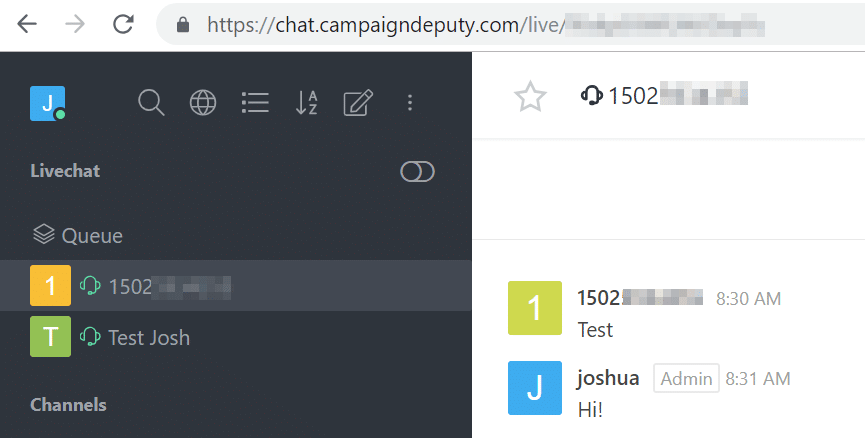
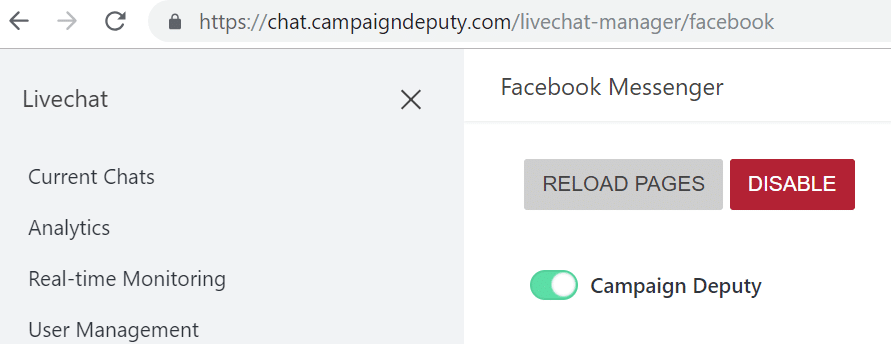
Campaigns have similar needs to some companies, scaling out their one-to-one communication across a team, and from one common contact point. Here at Campaign Deputy, we have internally been testing a new tool that allows us to provide Live Chat, Facebook Messenger and Text message support from one tool, and we did not have to build this one, just integrate with it. We have been using Rocket.Chat with Twilio for text messaging, and Facebook Messenger for our Facebook page. We looked at a lot of tools, and with prices approaching $20/user/month, we couldn’t find one we liked until we stumbled upon Rocket.Chat. We Self-Host, because we have the server space, you could to while their plans start at $4/user/month, it makes sense for a campaign to let someone else deal with the hosting.

We of course love the built in live chat, we can trigger custom messages per a page, if they spend more than a minute on a page, you can start to send them custom messages. Maybe a voter lands on your healthcare policy page, you could trigger a message to ask if they had any other questions about health care 2 minutes after they open the page.

Text Messaging is built in with Twilio. You can register a local phone number and integrate it into Rocket.Chat. Volunteers come and go, with one central platform you can keep the conversation going from one phone number and assign your team to built in queues, departments and more. If you are on the go, their mobile web app works great. We did have some issues with their Mobile App for Android, they are aware of the bug, so we encourage anyone to use the app in their web browser until that bug is fixed. A small price to pay for a tool that is 75% cheaper than most competitors, or free if you have an IT team. You do have to pay per a text message, and rates are $0.0075 per a text per Twilio’s pricing guide on January 2019.

This was just another tool we were impressed with and could see the potential for a campaign to use in the age where a strong digital strategy is needed for most campaigns.

Facebook support is easy to setup too. You can follow their documentation to setup the system, we had it setup in about 3 business days.

New Features Jan. 7th.

Recently we launched set of new features to make the experience with Campaign Deputy even better.

You can now complete a pledge from a person’s profile. Any pledge that is already completed will not show the “Complete” button. You will be asked to confirm completing the pledge, and then be redirected back to the profile.

Universe Search now lets you select additional columns and download directly from the page.


The Pledge Review report will now show you the Pledge Due Date and if it more than a day past, change the font to a red color to easily identify the pledge in the report.

4Q Email Guidance for your Digital Campaigns

With the Midterms right around the corner, now is a perfect time to fine tune your digital strategy. Below are some quick tips to get your digital campaigns going.

Send to those high open rate subscribers

Sending the same email to all subscribers mixes your message in with those who want to hear it, and those who may put off opening the email. If your open rate is not high enough, this could drag down your engagement metrics in the future. Send separate emails to those highly engaged subscribers, and send it before you send to your larger list.

Watch your subject lines

#govoteonthursdayat8am may not be the best subject line. Keep it short, 3 words are best and personalize it as well to get higher engagement. Mobile phones have small screens, so you won’t get a lot of text out of your subject line before it gets cut off.

Keep track of your audience

If I had a dollar every time a candidate emailed me to vote in their state primary, I would have tacos. Make sure to target your audience to those who can participate. Asking someone to go out and vote in a primary in a state they do not live, is a message that just looks bad and could increase your spam rate.

3 images or less

Keep the number of images low, this helps with Google’s inbox filtering as they use this as part of their algorithms to determine which label to apply and helps the email to load for those on the go mobile users.

Time to Send

Everyone sends at the top of every hour, or 15 minutes before or after. Those times could cause delays in getting your email to the users inbox and cause a “traffic jam” at your subscribers email servers. We see the highest open rates from 9PM-11PM EST on Tuesday with 9PM-11PM on Wednesday of each week. Everyone looks at their phone before they go to bed and clearing out an inbox to start the day fresh. We looked at this data from over 3 million data points, and we were shocked at the numbers too.


New Updates – August

We have been busy listening to all your feedback going into the upcoming November election. From updates to our Universe Search, to more integrations, and more integrations to go!

Action Network Integration

We had one of our new campaigns ask if we could build an integration with Action Network. They have a well defined API for us to work with and their Directory of Technology has been great to work with to help answer our questions. We can now sync your contacts from Action Network into Campaign Deputy. This includes Tags, if they are a part of an Action Network list. We also pull over events, so for those states that require disclosures of Events we have you covered.

Campaign Page

As part of the Action Network integration, we didn’t have a place for you to update your API Key(s), so we built a new Account Settings page to show you all the candidate information associated with your account. If you click on your name in the upper-right portion of the screen, you can access this new page and see which account you are logged into for our multi-account users. This page will also be the home for our future Zapier integration and more to come!

Universe Search

We have added more fields to our Universe Search. Action Network tags, Zip Code, Linked Attribution searching, Contribution Date. As part of our maintenance, we will be able to add details about emails actions as well.

Attribution Codes

As more campaigns import their previous data, we get a lot of attribution codes on one account. We are adding Cycle and an Archive flag to better handle these. The Universe Search is using our new Attribution Auto Suggest, we will be moving more of the system to use the Auto Suggest instead of drop downs.

Stripe Charges

If you have a contribution page with us, you will have access to a “Merchant Charges” report. We will show the most recent charges, but you can export any date range you would like. If you select a large date range please be patient, Stripe only allows us to pull 100 records at a time. We see most exports taking less than a minute.

Other Bug Fixes

  • You can now use a decimal place when doing a contribution search in the Universe Search.
  • Anonymous contributions are now showing on the contribution report.
  • Added Thank You Note Sent to contributions.

Upcoming Maintenance

We bought a new server months ago and now we just have to move our database to this new server.

Campaign Deputy will be down for maintenance from 9PM EST-11PM EST on Sunday, August 26th. Contributions, and Forms will not be affected. Contribution alerts will be delayed during this time.


Apple Email Security Updates

Email is constantly changing, and Apple recently made updates to their email service for emails hosted at the @mac.com, @me.com and @icloud.com email addresses.

Email security wasn’t well defined back in 1982, and allowed anyone to impersonate sending an email. An standard called DMARC stopped that and allows email providers to apply the most strict control. Apple chooses which servers are allowed to send emails from their domain, any other server will now be marked as spam, no exception.

Attempting to send an email from @mac.com, @me.com and @icloud.com outside of Apple Mail will immediately be marked as spam.

Apple Mail isn’t the first provider to do this, Gmail did this in 2016 and Yahoo in 2014. These changes help to limit the amount of spam from these domains and prevent phishing attacks.

If you want to send event invitations from an the hosts email address, it is now best to have them BCC their invitee list to give you the best chance to prevent you from being flagged with DMARC.

Sometimes an email will show “on behalf of domain.com” to work around this limitation with DMARC because the email address is actually written like the below address. Email clients make the format more human readable by showing the “on behalf of” separately. The resources link below has more detailed information about this and why you can’t remove it from Gmail, Yahoo, or Apple Mail.

personalemail=yahoo.com@send.mydomain.com

Resources

How Apple’s DMARC Changes Affect Email Senders

Gmail DMARC Update 2017

Why do some emails show “on behalf”


The Dos and Don’ts of Digital Campaigns

With both Political and Non-profit campaigns, running an effective digital campaign requires knowledge of a lot of areas to have a good digital presence. Here is a list of the Dos and Don’ts of Digital Campaigns.

Don’t

  • Run your email marketing through an @gmail address. Google limits you to 500 messages a day, once reached, you are done for 24 hours. If you need to send out an announcement or call to action, you’re limited to the first 500 supporters in your list.
  • Use BCC to send out email campaigns. This limits personalization and with one mistake, suddenly your entire email list may be in the hands of hundreds of other people.
  • Use the cheapest Web Host for your site. Running a website requires expertise, and having a slow website or one that has downtime could cost you critical donations. We have had to help so many people when these cheap options fail and the support tickets go on for days while a website is down.
  • Use or share username and passwords with your campaign staff.
  • Don’t use an insecure website and accept payments or contributions on the site. This is against against Payment Card Industry (PCI) regulation and increases your liability.
  • Forget to register a domain name.
  • Don’t import an old email list. Every email provider can detect this and will block your emails. This hurts your email repuation. Once it’s gone, it’s hard to recover.

Do

  • Find an email marketing provider to use for your campaign, this requires a domain name.
  • Use an email hosting provider, so that your campaign can respond using your campaign’s brand/domain.
  • Use an SSL certificate to secure your website, this protects anyone’s information when they give a contribution or signup for your email list.
  • Find a good hosting provider with good support options.
  • Personalize your email messages.


At Campaign Deputy, we provider email marketing, email hosting, web hosting and a SSL certificate all as part of every package we offer. We monitor everything 24×7 which includes email and phone support. Contact us today to learn more!


Fundraising CRM Uses

A Fundraising CRM helps to keep your data organized so that you don’t lose leads, or pledges, while trying to raise the most for your cause.

Pledges

Pledges are the “sales leads” of fundraising with two types, pledge to give, and pledge to raise. Both are critical to fundraising and with our built in pledge tracking, you can keep track of these pledges for both types. Using the build in pledge tracking, you can keep track of the due date, the liklehood of of the pledge, and send email reminders to the person who pledges to your organization. This is a great feature for both political campaigns and non-profits.

Call Time

Everyone gets the same email “Please give X to my Y to help my cause”. Our email inboxes are flooded with these requests. To stand out, call time is the difference. Using our call time manager, there is no more shuffling stacks of paper, you have all the information you need to make a call, connect, take notes, and add pledges all from the same screen. We have some users who spend 4+ hours on just this one page in Campaign Deputy!

2017 Year End Review

Since our launch in July, we have had an amazing year. We continue to expand in both size and feature set for CampaignDeputy.

Over 30 new features added.

We continue to build out features that campaigns are asking for to help make their campaign successful. Some large features added in 2017 was printed call sheets, person import, call time pledge emails, web site tracking, email and click tracking.

Three electronic filing systems completed.

We built CampaignDeputy to handle the various needs of each states electronic filing system. In 2017 we built out electronic filing for Arkansas, Kentucky and the FEC. For 2018 we look forward to continuing to add and will be expanding to Florida, Alabama and Ohio.

Over 700,000 Emails Sent

We sent 778,677 emails through our platform with three dedicated IPs. Email open rates ranged from 10% to 35%. We continue to monitor sending reputation to make sure each campaign maintains a high open and delivery rate.

Over $250,000 processed

Through our online contribution forms, we processed over $250,000. we continue to learn the best way to host contribution forms, and learned useful user behavior we can apply to 2018 now.

In four datacenters

As we continue to expand, we have turned on additional datacenters with multiple providers. When we first launched we started with just one. With the importance of having our contribution forms available 24×7 we increased the number of servers and spread them throughout the East and Mid-west for more reliance.