Launch Week: Day 1 – Call Time Manager

Launch Week: Call Time Manager

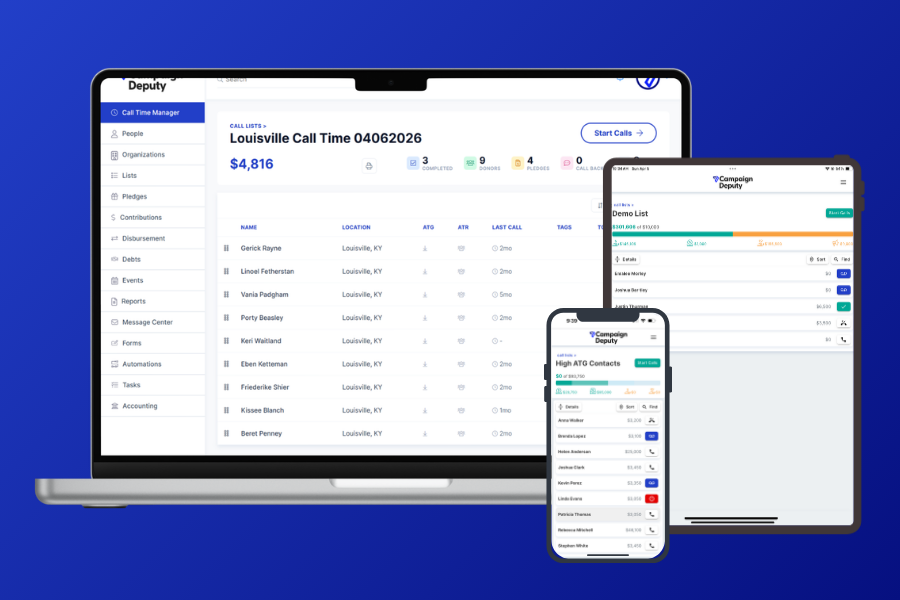
We rebuilt the Call Time Manager from the ground up based on your feedback.  Whether you’re dialing from a campaign office, the car, or your kitchen table, everything you need is right at your fingertips.

This new version, being API first, will allow us to scale up new features while having a similar exprience when you are on your laptop, or phone with data syncing between. No sync button, just all your activity in one spot for your, and your team. This will help empower your team to have the information they need to manage your call time.

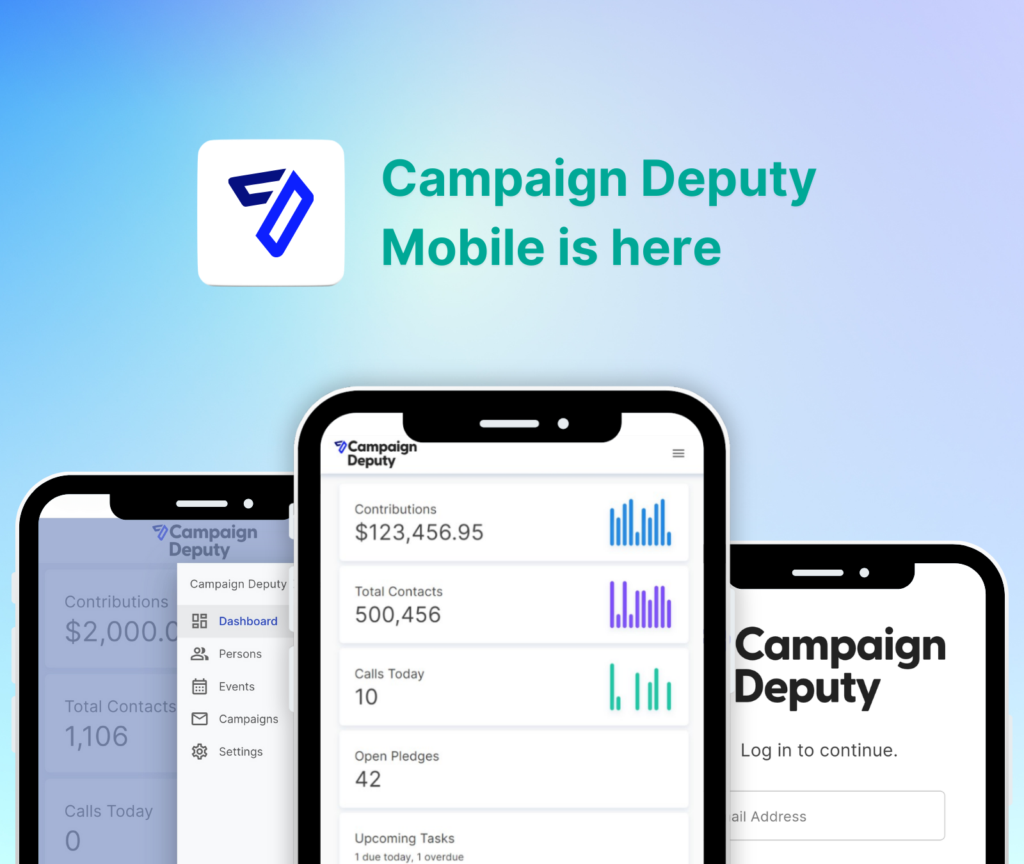
Now on iOS & Android

The Call Time Manager is now available on the App Store and Google Play. Take your call program on the go — dial, track, and follow up from anywhere, on any device.

Send Emails & Texts Right from Call Time

Setup multiple email and text templates to customize your call time. Send an email while on a call and add a donor to a list when saving the call. More options, more ways to reach that donor on your call list. On moble, write the text and send it using your number, without having to copy/paste the message or number. Perfect for follow-ups, thank-you, and pledge reminders while the conversation is still front of mind.

Look out for Day 3 for even more features that will make call time easier.

A Smarter Call Time Report
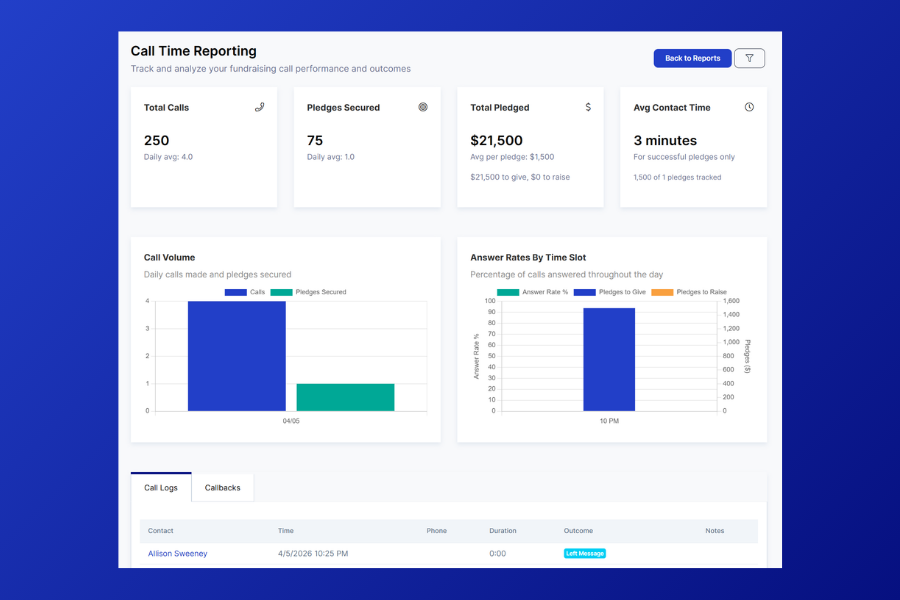
The Call Time report got a full makeover. Quickly see how many calls are being made a day, when the best hours are for answer rates, and filter to a specific date if needed.

Sort & Rank Your Call Lists

Take control of your lists. Sort donors by ask to give or ask to raise amount, and rank your calls however makes sense for your program. Drag a contact to a specific spot in the list to spread out calls for your candidate. Helping you get to the right call at the right time has never been easier.
Texas Campaign Finance 2026: TEC Deadlines, No Limits, and No Extensions

Texas is big on fundraising freedom but strict on deadlines. There are no general contribution limits for most state races, but the Texas Ethics Commission (TEC) enforces filing deadlines, no extensions are allowed for pre-election reports.

Candidate Filing Periods

Before you worry about campaign finance reports, you need to actually file to run:

  • Statewide/legislative races: Filing opened noon December 1, 2025 and closed noon December 19, 2025
  • Municipal races (even-year): Filing opens noon July 6, 2026 and closes noon July 17, 2026

No Contribution Limits (Mostly)

Texas does not impose general contribution limits for state legislative or executive races. Individuals, PACs, and other donors can give unlimited amounts. But there are exceptions:

  • Judicial candidates: Subject to limits under the Judicial Campaign Fairness Act (amounts vary by district population)
  • Corporate contributions to candidates: Prohibited
  • Union contributions to candidates: Prohibited
  • Cash contributions: Limited to $100 per contributor per reporting period
  • Appoint Your Treasurer First
    Before you accept a single contribution or spend a dollar, file a Campaign Treasurer Appointment (Form CTA) with the appropriate authority. No CTA on file = no legal fundraising.

2026 Filing Deadlines

  • January Semiannual (Jul–Dec 2025): January 15, 2026
  • 30-Day Pre-Primary: February 2, 2026
  • 8-Day Pre-Primary: February 23, 2026
  • July Semiannual (Jan–Jun 2026): July 15, 2026
  • 30-Day Pre-General: Early October 2026
  • 8-Day Pre-General: Late October 2026
  • No extensions. No exceptions. The TEC does not grant deadline extensions for pre-election reports under any circumstances. Plan accordingly.

State vs. Local Filing

  • State candidates: File with the Texas Ethics Commission
  • County/local candidates: File with the county clerk or elections administrator

The TEC has a helpful “When is My Report Due?” tool and separate guides for state filers and local filers.

Key Contacts

Contact the Texas Ethics Commission if you have any questions about regulations. They can help give guidance and you need to file a Treasurer Appointment before you can fundraise.

Texas Ethics Commission: (512) 463-5800
Address: 201 E. 14th Street, 10th Floor, Austin, TX 78701
Website: ethics.state.tx.us
Don’t Risk a Missed Deadline
With no extensions available, a missed pre-election deadline means automatic penalties.

Campaign Deputy can create dedicated import files to quickly import your data into TEC. This helps t to comply with your reporting requirements and reduce the time you need to manage your transaction.

Schedule a demo to see NC campaign finance in Campaign Deputy.

North Carolina Campaign Finance 2026: NCSBE Deadlines, Limits, and Filing Rules

North Carolina campaigns file with the State Board of Elections (NCSBE) and follow a reporting schedule that mixes semi-annual reports with pre-election and post-election filings. If you’re on the ballot in 2026, here’s what you need to have on your radar as a candidate, committee, or treasurer.

Candidate Filing Periods

Before you worry about campaign finance reports, you need to actually file to run:

  • Statewide/legislative races: Filing opened noon December 1, 2025 and closed noon December 19, 2025
  • Municipal races (even-year): Filing opens noon July 6, 2026 and closes noon July 17, 2026

Contribution Limits

  • Individuals: $6,400 per election
  • PACs: $6,400 per election
  • Corporations and unions: Cannot contribute directly to candidates
  • Primary and general are separate elections, so one individual could give up to $12,800 across the full cycle.

2026 Reporting Schedule

  • Annual Report: Due January 30, 2026 (covering all of 2025)
  • Semi-annual reports: Mid-year and year-end
  • Pre-primary report: Due before the primary election
  • Pre-general report: Due before the general election
  • Post-election reports: Due after primary and general

The schedule varies by race type (state, county, municipal). The NCSBE publishes specific schedules at ncsbe.gov.

Corporate Contributions

Like several other states, North Carolina prohibits direct corporate and union contributions to candidates. Corporations may fund PACs, but cannot donate directly to your campaign committee.

Get Help

You can contact the NCSBE as they have the final say for all campaign finance regulations. If you have a specific question, we do recommned to contact the NC first for guidance.

Email: campaign.reporting@ncsbe.gov
Phone: (919) 814-0700
Manual: Campaign Finance Manual (PDF)
File with Confidence

Campaign Deputy can create your NCSBE electronic file to comply with your reporting requirements. Integrations with common progressive tools reduce the time you need to manage your transaction.

Schedule a demo to see NC campaign finance in Campaign Deputy.

Campaign Deputy’s Project Forward Announcement

The Future of Democratic Fundraising:

Campaign Deputy Launches First Integrated CRM with AI

While 2024’s results weren’t what we had hoped for, our commitment to supporting Democratic candidates, campaigns, and causes remains unwavering. At Campaign Deputy, we’ve dedicated the past six months to an ambitious expansion of our Fundraising CRM, we’ve dubbed, Project Forward. This initiative was shaped by numerous in-depth conversations with campaign managers, treasurers, consultants, and activists who shared with us their first-hand experiences in the field. Similarly, we’ve been observing how new AI tools have reshaped how campaigns communicate and organize. 

Following months of studying how campaigns use our platform, from tracking donations to filing FEC reports it became clear that fundraising technology needed to adapt – not just with AI, but with smarter, more connected tools that reduce the modern campaign’s workload. Project Forward brings together what we’ve learned, adding features that campaigns have been asking for, including built-in accounting capabilities, a mobile app for on-the-go access, and smart assistance powered by AI to help streamline common fundraising tasks.

The message from Democratic campaigns was clear – they need technology that fits naturally into their workflow, not the other way around. With Project Forward, we’re making Campaign Deputy more useful by bringing key campaign functions into one place. Whether you’re managing a state-wide race or running for local office, these new features are designed to help you spend less time on paperwork and more time fostering genuine connections with supporters.

Project Forward: A Week of Innovation

Starting Monday, January 27th, we’re rolling out Project Forward’s features day by day, giving you time to explore and integrate each new capability into your fundraising workflow. Each release addresses specific challenges we’ve heard from campaigns, from the need for on-the-go access to expanded campaign finance tools.

Here’s what’s coming:

  • Monday – Monday unveils our mobile companion app for both Android and iOS. Take Campaign Deputy with you wherever you go – make calls, review pledges, manage event check-ins, and even schedule email broadcasts directly from your phone.
  • Tuesday – Tuesday, our new Email Provider Analytics dashboard gives you unprecedented visibility into message deliverability, while enhanced automation features let you create sophisticated workflows with mid-sequence conditional splits and search-triggered actions. Plus, seamlessly export your data to Google Sheets for collaborative analysis. Coming in Q3: customizable sending controls for precise management of email velocity, from 100 emails per hour to 2,000 per second.
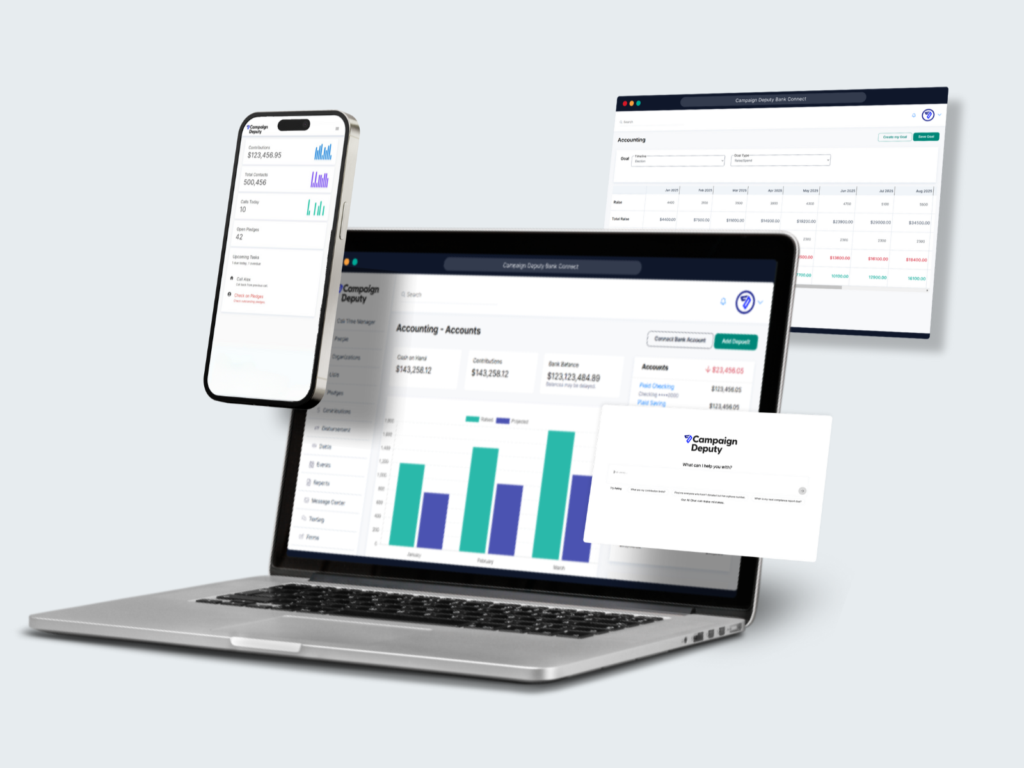
  • Wednesday – Wednesday introduces Bank Connect – a first-of-its-kind feature that brings accounting capabilities directly into your fundraising platform. No more bouncing between Campaign Deputy and your accounting software. Track Cash on Hand, manage FEC reporting, handle compliance, and monitor fundraising progress all from one central hub.
  • Thursday – Thursday debuts Campaign Deputy’s first AI assistant, your AI-powered fundraising volunteer designed to streamline your campaign operations. From building custom contact lists to retrieving donor information to guiding you through Campaign Deputy’s features, this intelligent assistant helps make fundraising more efficient than ever.
  • Friday – Friday wraps up our launch week with a comprehensive overview of all these new features and practical ways to implement them in your campaign.

As we look ahead to 2025, we see incredible potential for Democratic and Progressive fundraising. Project Forward isn’t just about new features – it’s about giving campaigns the tools they need to build stronger connections with supporters and run more efficient operations. By bringing together fundraising, compliance, and accounting in one platform, enhanced by AI assistance, we’re helping campaigns focus on what matters most: their message and their community.

None of this would be possible without the trust and partnership of our users. Your feedback, suggestions, and daily interactions with Campaign Deputy have shaped every aspect of these updates. We’re grateful for your continued support and excited to see how you’ll use these new tools to power your fundraising success in 2025 and beyond.

Get Started with Project Forward

Ready to see these features in action? Current users can log in each day to explore our new mobile app, try out Bank Connect, or start working with our new AI tool. New to Campaign Deputy? Schedule a personalized demo to see how our all-in-one platform can transform your campaign’s fundraising efforts.

Book your demo call today or reach out to our team to learn more about making Project Forward work for your campaign.

Why Registering Your 10DLC Matters

Est. reading time: 10 min. Quickly engage donors directly with 10DLC, placing your outreach strategy right in their pockets. Start your journey towards reliable, impactful, and trustworthy text-based fundraising by registering for 10DLC today. Take your fundraising efforts to new heights with 10DLC.

Continue reading

On the road to broadcast texting

While working with our campaigns, we wanted to provide something more than just sending out texts. We wanted to provide a way to automate or donor to the campaign in an automated way. We created a way to rent a Toll Free number or local number, and set up texting keywords or Opt-In flows that use AI to pull the name out of the response given.

Why Toll Free?

Toll Free numbers are a quick and very affordable way to get a number that can send more than 1 text a second. Local Area Code numbers are limited to 1 text per second while Toll Free numbers start at 3 texts a second and can be adjusted to send 25 texts a second. To send 1,000 text using a local area code would take 17 minutes, with a toll-free number it can take between 1 minute and 6 minutes.

What about a short code? Short codes are expensive and requires 8-12 weeks to setup with each carrier.

Short Codes are expensive. Our fee for a short code starts at $1,200 a month with a minimum of a 6 month contract. Most of that fee is paid to the carrier for registration and what they call a Monthly Maintenance Fee. It also takes 8-12 weeks to get approval for a short code. Based on your fundraising cycle, 8-12 weeks may be after your Primary or General election.

Why AI?

When we ran out first internal test, the opt-in flow picked up the wrong responses to “What is your name to confirm your opt-in?”. People would text back “My name is Charlie”, or “Sure, it’s Alex”. We realized that we didn’t want to store someone’s name as the whole response. We processed the response through AI to grab just their name to pick up “Charlie” , “Alex” as the name. This also helps to de-duplicate them in the system and check to see if there is already a record in your database.

Calls Too

Each phone number can be set up to forward a call to another phone. The person who is calling will show up on your caller id but the caller won’t have access to your phone number. With our P2P Texting campaigns, we see a few people who call the number back. We wanted to make sure if someone needed to, they had the option of talking to someone on your team.

Getting Started

Every active account will receive an email starting May 15th with details on how to set up their number. We are including 1 free toll-free number to every account. Make sure to provide feedback to your account manager with any questions, comments, or suggestions while using this new feature.

If you are not an active client, use our Contact Us form to see our latest demo.

April 2020 Updates

Campaigning in 2020 is unlike anything we’ve seen before. Campaigns have been adapting and so havewe.. We have seen a shift in donations, more to come later on that, and an increased use of our P2P Texting to reach voters.

Whats New

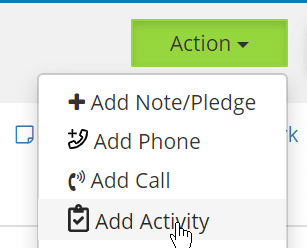
With teams meeting virtually, you can now track outbound emails in one of two ways. First, you can add an Activity to a profile to track of communications that aren’t a call. At the moment, we have only turned on Email tracking. We are looking to merge call time into our Activity Tracking soon.

New Add Activity option available

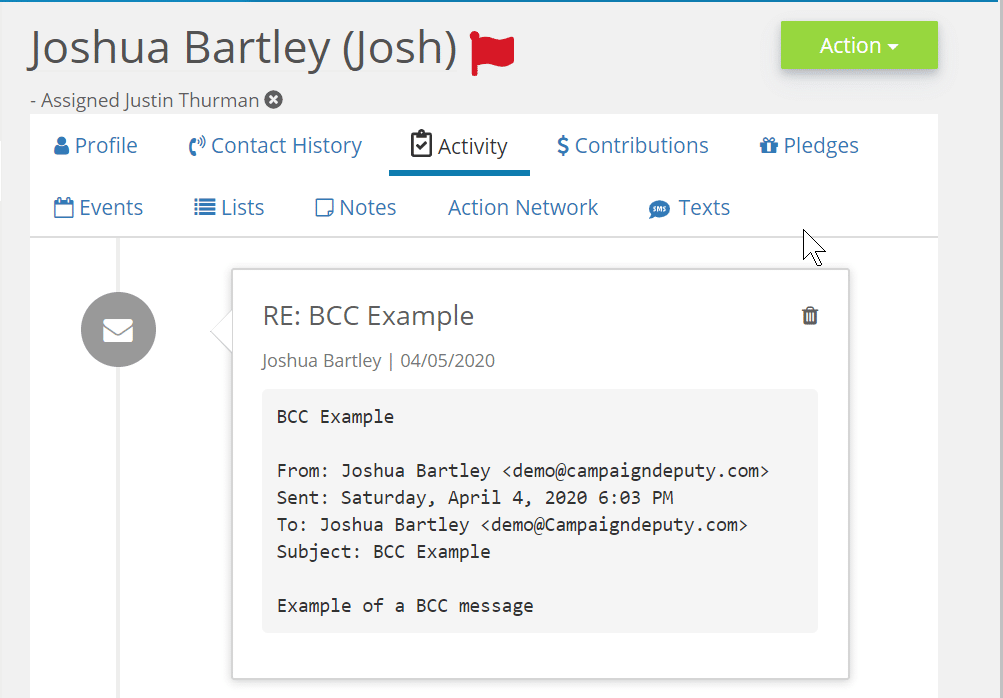
The second way, is a BCC Email. With each email you send, you can include your account’s specific email address in the BCC field and we will tag it to their profile. Saving you the extra step. The BCC email for your campaign will be your campaign’s full name followed by@campaigndeputymail.com. For example, your BCC email for “Alex for Senate” would be alexforsenate@campaigndeputymail.com. Check our our help documentation on how to automatically include this email as a BCC in G-suite, or Outlook.

Example of an incoming BCC email for a campaign

Mobile Texting

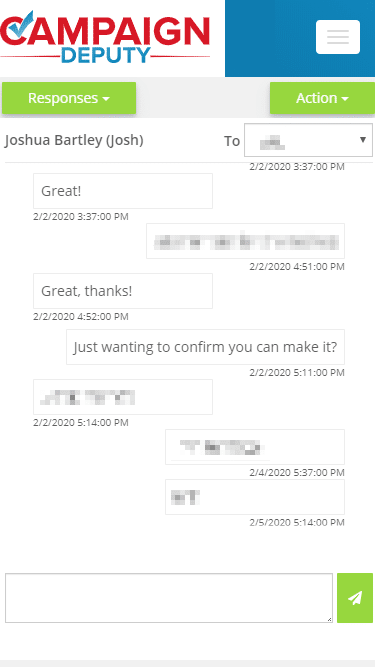
When we first launched our P2P texting, most volunteers were in the campaign office working side-by-side the Field Team for GOTV texts. Things quickly changed, so we changed our texting to have a mobile-friendly view.

Mobile view of texting.

New Domain Name

When we first launched, most websites ended with .com, .net, .org, or .io. Recent industry changes have allowed multiple new top level domains (TLDs) including .app. We wanted to let our security-minded users know that we also own campaigndeputy.app. It has the distinct advantage in that Chrome, Firefox, and Safari require all connections to be encrypted by default. Most connections only require it after the first connection. If you happen to block 3rd party domains as a privacy measure, please add an exemption for campaigndeputy.app in your browser plugin.

Other Updates

  • Fixed a padding issue on mobile devices for certain pages to make viewing easier.
  • Fixed an issue when editing debt payments that are linked to a disbursement.
  • Per new policies from the FEC, we moved a few compliance notes out of the memo field to the purpose field.
  • Fixed an issue with calculating Average Call Time on the call time report.
  • Thank You Note reports export dates to an easier date format.
  • Email images can be added while editing an email and can be dragged and dropped in the Editor.

Social Media Links

How do images and text show up when you add a link to your Facebook post or Twitter? Each one is different, Facebook has “Open Graph” and Twitter has “Twitter Card Tags”. Both allow you to tweak your message and show a short example of the content before someone clicks into your link.

Your Campaign Website

Your campaign website will be shared via social media channels. You can preview what a share would look like using the links below. If you have recently changed your website, you can use the tools below to refresh Facebook/Twitter’s copy of your website. Each page on your site can display a different image or message, make sure to test them all.

Ask you web designer to add the necessary tags to support Facebook and Twitter. If you are using WordPress, Yoast SEO provides options to choose what you want displayed. Squarespace also supports adding tags to your site.

Example of our site on Facebook

ActBlue

The ActBlue default tag is “I just gave to Candidate” and displays when you post an ActBlue link on social media. You can update this per each ActBlue contribution form to customize your message and even add your own logo to the link.

Campaign Deputy Forms

Our hosted forms support both Facebook Open Graph and Twitter Cards. You can update the message of a form by going to the Style tab and adding your own custom message to the Social Media Message field. Our forms are used for many different purposes, each form will need to be updated with a Social Media Message. Our embedded form option requires your web designer to select the tags for Facebook to pick them up correctly. Have your web designer contact our support team for more details.

Apple Email Security Updates

Email is constantly changing, and Apple recently made updates to their email service for emails hosted at the @mac.com, @me.com and @icloud.com email addresses.

Email security wasn’t well defined back in 1982, and allowed anyone to impersonate sending an email. An standard called DMARC stopped that and allows email providers to apply the most strict control. Apple chooses which servers are allowed to send emails from their domain, any other server will now be marked as spam, no exception.

Attempting to send an email from @mac.com, @me.com and @icloud.com outside of Apple Mail will immediately be marked as spam.

Apple Mail isn’t the first provider to do this, Gmail did this in 2016 and Yahoo in 2014. These changes help to limit the amount of spam from these domains and prevent phishing attacks.

If you want to send event invitations from an the hosts email address, it is now best to have them BCC their invitee list to give you the best chance to prevent you from being flagged with DMARC.

Sometimes an email will show “on behalf of domain.com” to work around this limitation with DMARC because the email address is actually written like the below address. Email clients make the format more human readable by showing the “on behalf of” separately. The resources link below has more detailed information about this and why you can’t remove it from Gmail, Yahoo, or Apple Mail.

personalemail=yahoo.com@send.mydomain.com

Resources

How Apple’s DMARC Changes Affect Email Senders

Gmail DMARC Update 2017

Why do some emails show “on behalf”