4-year Anniversary – Release Notes

Campaign Deputy is celebrating it’s four-year anniversary today when we publicly launched back in July of 2017. Campaign Deputy launched with the help of some takeout food, a kitchen table and a 2-liter that was not diet (oops). Since then, we have helped campaigns from a School board seat, Council, Mayor, County Treasurer, State Representative, House of Representatives and Governor.

New Look

We switched to a new look and a new domain (us.campaigndeputy.app) with a select group of users and now have everyone migrated over to the new site! Campaign Deputy was updated to be more mobile friendly, a new more standard look, and faster. Our goal is to improve every year and the software gets a boost from our vendors doing the same. The switch to .app starts every connection over HTTPS and uses DNSSEC for added security features.

New Pricing

Don’t worry, we are lowering pricing. Our State, Congressional, State-Wide and Senate pricing now start their additional email pricing at $1.00/thousand. Volume Pricing starts at 250,000 additional emails. We are also creating a new High-Email plan for Congressional, State-Wide and Senate to include more emails a month as part of the base plan.

Updated Message Center

We updated our Message Center to send out emails faster, and to load statistics faster. Our delivered/open/click moved to a serverless model to calculate for each email campaign as we outgrew trying to calculate those on the fly. The Message Center now loads faster, and we send out emails 200% faster than we did this time last year. We added a Raised column that integrates with ActBlue and A/B Testing for an email campaign. Email Campaigns have the choice to use Templates and create a sender directly in the Campaign Editor. We improved our Merge Tags with Liquid templates with 4 custom preview profiles and a detailed error message when there is an issue with the Liquid syntax. No more hunting for that extra {{ in your email. New merge fields and advance syntax is available in our support portal or from your Account Manager.

Updated Forms

Forms received an upgrade with our new Landing Page and Zapier (more below) forms. Landing Page forms allow you the ability to create a custom page using our drag-and-drop editor to build a very stylist page for both the page and thank you page. They also support redirect options and a custom setting for the iOS 14 conversion tracking. A deeper integration with our Message Center allows you to track a donation from Email->Form->Redirect to ActBlue automatically.

Custom Domains

Need a custom domain for your brand or for iOS 14 updates? We now, officially, offer custom domains for the act.campaigndeputy.com hosted site. Once enabled, Campaign Deputy switches the links internally to your domain. The same attribution tracking follows for our domain and yours for dollars raised.

Source Codes

Campaign Deputy now tracks two types of Source Codes, one at the Contribution level and one at the Person level. For ActBlue, source codes are translated from the refCode parameter and assigned to the Contribution. If the donor does not already have an Origin Source Code, Campaign Deputy will assign it for their first Contribution. Already have donors you want setup with a Source Code before they donate? Our Import process allows you to assign a source code as part of the import process. When you send an email from our Message Center, you can use the Tracking Parameters feature to update your Source Code for all of your links in one place not eight.

Custom Fields

Our first Custom Field was back in 2018, and was more of a “Contact Support” option. Now you can setup Custom Fields in the Account Settings with three different types, Text, Decimal, and Lookup. Those are all available in the Universe Search with Decimal allowing you to search for > or < for a specific amount. Want to add a Lifetime Value field, add a Custom Field with a Decimal type and reference it in your Segments. Our Import process has been updated to import, and update, Custom Fields on records as well. Learn more at our Custom Fields Feature Update post.

Event RSVPs

We had a few people use our Forms as a RSVP feature, which separated it from our Events area in the system. We recently launched Event RSVPs to enhance our Guest List feature. Built on the same tech as our Landing Pages, you can customize your RSVP page with our drag-and-drop editor. We have included a base template that works great on desktop or mobile bowsers to help get you started. Event RSVPs pages support Thank You Pages and custom Redirects. If you have a Custom Domain hosted by use they use that domain as well.

Compliance

Recently we became an approved vendor for Campaign Finance in Pennsylvania. This is in addition to our FEC compliance, Kentucky Compliance Upload, Ohio, Indiana, Michigan, Oklahoma, Alabama, Virginia (COMET) with a few more states pending approval. Don’t see your state listed, contact us. Some states do not require an approval process and can be added quickly.

Series

Other systems call them Drip Campaigns, Welcome Series or Ladders, we call them Series. Series were built out last year and received a major upgrade. You can create a Series with unlimited Conditional Splits. Series already support sending out emails, delays, and adding a person to a list. With Conditional Splits you can send out a reminder to donate, and another if they don’t, and another if they don’t. You could do a third or add them to a suppression list. The options are truly unlimited, though we recommend a large monitor if you take us up on that offer.

Zapier

We launched a Zapier integration last year and now you can request your Zapier API Key from your Account Settings. Zapier integrates with our Forms to allow you to trigger an auto-response email or to start a Series. If you want to add people, there is also a Zap to add people as well.

Integrations

We created a new Integration with PhoneBurner, DonorBox and working on an integration with Mobilize. We are exploring an integration with AirCall and Justcall as well. A VoteBuilder API can be requested through your State Party if you want a VoteBuilder integration. Don’t see an integration you are looking for? Contact us to start that conversation.

Campaign Deputy API

Back in early 2019, we were ready to launch our first mobile app to help fundraising teams collect donations in person. Plans changed and we launched P2P texting as one of the lowest cost vendors for P2P last cycle. Now, we have a few organizations who want to build an integration with us and we have relaunched our API. Our API Documentation includes example code in major languages like Javascript, Java, Node, PHP, Python, R, Ruby, Go, C#, Swift, and Curl for the command line users out there. One major part we changed with our API is the permissions. In Campaign Deputy, users have somewhat broad permissions over certain areas. Our API has finer grain access controls, called Scopes, that allow for a very exact set of permissions that a web application couldn’t support. Scopes will allow you to setup an API Key that gives a website access to a “Scope”. For example, our sales form uses the Scopes “create_person”, “create_task”. If someone had that API Key, they couldn’t access your database since they wouldn’t have the “read_person” Scope. This also meets the NIST Cybersecurity Framework guideline of “least privilege and separation of duties”.

Have a question that we did not cover above? Use the form below and we can setup a time to talk.

Contact Us

You will receive an email from our sales team with their availability for a short demo and an option to setup a free trial based on your account type.

Phone

(202)-915-0500

Custom Fields

One of our top 3 requested features has released, Custom Fields. We have been building this feature behind the scenes for a while. The VAN ID was built out as a default Custom Field for everyone in early 2020. We had a few state-wide campaigns use Custom Fields in 2018 and our Support Team could add a new field if requested. We found most did not need a Custom Field, the ones that did really needed a custom field.

One major piece of us waiting to build out custom fields is that we wanted it to be extremely useful. Database design is tough, and we had enough use cases to understand what everyone wanted. We built out three different types of custom fields, Text, Decimal, Lookup. Most systems only have Text as a custom field, not very useful if you wanted to search based on a number. Lookup was another type provided by a campaign for when you only need a handful of values. I’m sure everyone has seen an Excel file with data in the wrong column, or 3 columns worth of data in one. Lookup helps by limiting what you can enter. Lets say you have a lookup of A, B, C. Your searches/segments are quick and easy, it will always be either A, or B, or C.

Custom Fields can be searched for in the Universe Search as well.

If the Type is Decimal you can search by greater or less than for your searches. If type Text/Lookup you can search by equal, starts with, contains.

Custom Fields are also available during Imports. Decimals support values of $1,500 or 1500.24. Text supports up to 255 characters and Lookup supports the values you pick. In the example above that would be A, B, C. Lookups also support “a “, or “b” to try to find a match.

Contact Us

You will receive an email from our sales team with their availability for a short demo and an option to setup a free trial based on your account type.

Phone

(202)-915-0500

Event RSVP Tracking

In Early June we launched Event RSVP tracking to a group of beta testers and it was a huge success! A campaign, or organization, can have multiple types of events and our users have been asking how to track RSVPs as part of their fundraising process. These events typically mailed out or emailed out to a group of guests a host knows. Our Forms worked for a time, while this Event RSVP integrates more with our Event system and compliance aspects of fundraising. Some states require total raised to be recorded per an event. With our ActBlue integration with custom refCodes and our own donation platform, this is even easier to track. Also exciting as it’s the launch of our first Campaign Deputy designed template.

Each Event has an option to make the Event public. This allows the RSVP feature to set a Unique URL and edit the default template for the form. The form supports custom fields as well as some additional fields specific to Events, Additional Guest and the Unable to Attend option. Once a person signs up for an Event, you will see them in the Guest List tab and Response tab. The Response tab has the full details, including custom fields, of their response. You also have full control over the output of the Event page and the Thank You Page. Redirects are also an option with URL Parameters that will get passed to your redirect URL for those who use Source Reporting.

Contact Us

You will receive an email from our sales team with their availability for a short demo and an option to setup a free trial based on your account type.

Phone

(202)-915-0500

Facebook iOS 14 changes with ActBlue

With the recent privacy changes with iOS 14 and Facebook we have a solution to track your conversion events with Facebook using our Forms.

Now edit the Thank You Page with your custom message and add a HTML Block with the Javascript code below. Make sure you have already added your Facebook Pixel ID in your setting.

Copy paste the code below in. The /100 is from ActBlue as they pass the value over as total Cents not as a dollar amount, so $21.21 would be 2121 as the amount.

function() {
const actblueParams = new URLSearchParams(window.location.search);
fbq("track", "Purchase", { currency: "USD", value: actblueParams.get("amount")/100 });
})();

For the Javascript developers, we poly-fill the URLSearchParams for Internet Explorer users which makes the code a lot easier to read than parsing out the location.search parameter by hand.

Now redirect your http://act.campaigndeputy.com/thankyou/{formname}?amount={{amount}}&refcode={{refcode}}&name={{name}}

What about custom domains?

Glad you asked, talk to your account manager to get the DNS entries needed. Depending on your account there may be a small up-charge. Someone from your team will need to apply the DNS entries. If you are using SquareSpace, Wix, Weebly or Campaign Partner the DNS change likely will need to be made in those systems. If not, ask who registered the domain at a place like Name.com (preffered), Google Domains, Godaddy, 1&1 or Gandi.

Email Editor Updates

We have made several updates to our email editor based on feedback from our community. About 9 months ago we wanted to move to a more advanced template option beyond a find and replace that was used when it was first launched. One of the major drivers for the change was our Call Time Manager. The first email editor lacked the sophistication that we wanted for all types of donor communication. .We settled on an open source tool that allows us to customize a template, add new features to it over time and is fast so we can send out emails to those large groups. We also wanted to keep the look and feel of the industry standard Liquid templates that seem to be everywhere.

Autocomplete for Liquid Fields

Type { and the list of available fields show with type ahead

We have added location information and donor history to the email merge fields. This allows for some great ideas for customizing your emails.
{{if city='Louisville'}} RSVP to our event {{else}} RSVP to our Zoom event {{end}}
{{if lifetime_contributions>10000}} thank you for being huge supporter over the years{{else}} we appreciate every donation {{end}}
{{if zip}} be one of the {{math.random 10 25}} supporters in {{zip}} {{else}} we need 76 supporters by midnight {{end}}

Restricted Domains

We have a range of clients, from school board to Governor, PACs, non-profits and even one law firm. Historically, you could ask our support team to put in a block for a specific domain name based on your needs. (Looking at you .us school systems). Now those options are available for you in Account Settings. It’s also tiered in that you can block all .gov and .us or you can say .gov and .jeffersonkyschools.us to be exact for those local agencies that don’t use a .gov domain.

Upcoming Features

We still have more features in the works for our email system. We have a few people Beta testing our AB Testing, new segment filters and a GIF countdown timer. The GIF countdown timer is the biggest upcoming feature as generating 10,000 GIFs on open was a fun challenge for our team. We will be deploying that in both a West Coast and East Coast datacenters once we do a week long verification.

Pennsylvania Approved Campaign Finance Vendor

Campaign Deputy is now an approved Campaign Finance Vendor for Democrat and Progressive Political Campaigns and PACs for the state of Pennsylvania. You can now electronically file your campaign finance reports with the reports Campaign Deputy generates.

Filling reports is similar to our other states as we provide a list of reports for your campaign, the ending period date and the due by date. You also have the option to amend a previous report. Once a report is generated, you can download the report and use that to upload it to Pennsylvania’s Campaign Finance system at PA Campaign Finance Online . You will need a login which the Department of State can provide.

Generate Campaign Finance Reports

This is in addition to our FEC electronic filling for Federal Campaign and Federal PACs in Pennsylvania. This expands Campaign Deputy to bring affordable donor management and campaign finance solutions to the state of Pennsylvania.

Sign up now for a demo at https://campaigndeputy.com/lp/free-trial-14/

Keeping track of your tasks

We’ve all tried different ways to track tasks: reminders on our phones, calendar reminders, To-Do lists and sticky notes. We did a quick proof-of-concept for task tracking inside Campaign Deputy and we couldn’t stop. We are releasing our task tracking now. In future releases, you will be able to track task completion across your team and visualize what’s outstanding and what has been completed.

Add a Task

Our new Add Task pop-up will let you create a task, assign a due date, link it to a person’s record and assign it to members of your team. Upon assignment they will be notified about the new task. An email reminder will go out the morning of the date you specify. Users will also receive a daily digest email about all of their active tasks.

On your dashboard, you can see your active tasks along with a dedicated Task area for Active, Upcoming, Due Today and Completed tasks.

We have much more planned for tasks in the future. We already are working on linking Task with Pledges and Call Backs with our Call Time Manager. Stay tuned for March where we are announcing more updates.

Track your Link Clicks

As the campaign trail moves towards November 3rd, digital teams are ramping up their analytics. One request we had was How do you track when something happened with your lists? We looked at how our internal sales team tracks their actions and worked on ways this could apply to a campaign. We found that campaigns could track the conversion but not the pipeline. It’s great to know you just signed up 100 more donors, where did they come from and how many didn’t convert?

We built dpty.us, a new URL Shortner to help track your links. You may have seen these in social media feeds from various tools, but they started to become expensive to enable an API, and then would require each campaign to setup their own account and setup an API key. Yeah, we just lost 90% of our campaigns right there. We wanted this to be integrated into Campaign Deputy, and we need a link tool for our future plans for broadcast texting.

Our Digital Dashboard is where we are migrating most digital tasks to.

We will be enabling our our new Digital Dashboard for campaign starting in July 1st, 2020.

For the techies in the crowd, we knew that the scale on this feature would be huge. We build it using serverless technologies and it’s currently hosted in an Ohio cloud datacenter. If 10,000 people click on a link in the same second, our cloud provider will instantly spin up our code to handle the load and then spin down those servers after the load drops. As the popularity of this grows, we will launch additional regions on the East and West Coast. Currently our average response time is 0.25 seconds with 95% of users seeing a response tie of 0.44 seconds. To most this will be almost invisible for them.

On the road to broadcast texting

While working with our campaigns, we wanted to provide something more than just sending out texts. We wanted to provide a way to automate or donor to the campaign in an automated way. We created a way to rent a Toll Free number or local number, and set up texting keywords or Opt-In flows that use AI to pull the name out of the response given.

Why Toll Free?

Toll Free numbers are a quick and very affordable way to get a number that can send more than 1 text a second. Local Area Code numbers are limited to 1 text per second while Toll Free numbers start at 3 texts a second and can be adjusted to send 25 texts a second. To send 1,000 text using a local area code would take 17 minutes, with a toll-free number it can take between 1 minute and 6 minutes.

What about a short code? Short codes are expensive and requires 8-12 weeks to setup with each carrier.

Short Codes are expensive. Our fee for a short code starts at $1,200 a month with a minimum of a 6 month contract. Most of that fee is paid to the carrier for registration and what they call a Monthly Maintenance Fee. It also takes 8-12 weeks to get approval for a short code. Based on your fundraising cycle, 8-12 weeks may be after your Primary or General election.

Why AI?

When we ran out first internal test, the opt-in flow picked up the wrong responses to “What is your name to confirm your opt-in?”. People would text back “My name is Charlie”, or “Sure, it’s Alex”. We realized that we didn’t want to store someone’s name as the whole response. We processed the response through AI to grab just their name to pick up “Charlie” , “Alex” as the name. This also helps to de-duplicate them in the system and check to see if there is already a record in your database.

Calls Too

Each phone number can be set up to forward a call to another phone. The person who is calling will show up on your caller id but the caller won’t have access to your phone number. With our P2P Texting campaigns, we see a few people who call the number back. We wanted to make sure if someone needed to, they had the option of talking to someone on your team.

Getting Started

Every active account will receive an email starting May 15th with details on how to set up their number. We are including 1 free toll-free number to every account. Make sure to provide feedback to your account manager with any questions, comments, or suggestions while using this new feature.

If you are not an active client, use our Contact Us form to see our latest demo.

April 2020 Updates

Campaigning in 2020 is unlike anything we’ve seen before. Campaigns have been adapting and so havewe.. We have seen a shift in donations, more to come later on that, and an increased use of our P2P Texting to reach voters.

Whats New

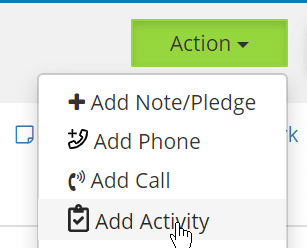
With teams meeting virtually, you can now track outbound emails in one of two ways. First, you can add an Activity to a profile to track of communications that aren’t a call. At the moment, we have only turned on Email tracking. We are looking to merge call time into our Activity Tracking soon.

New Add Activity option available

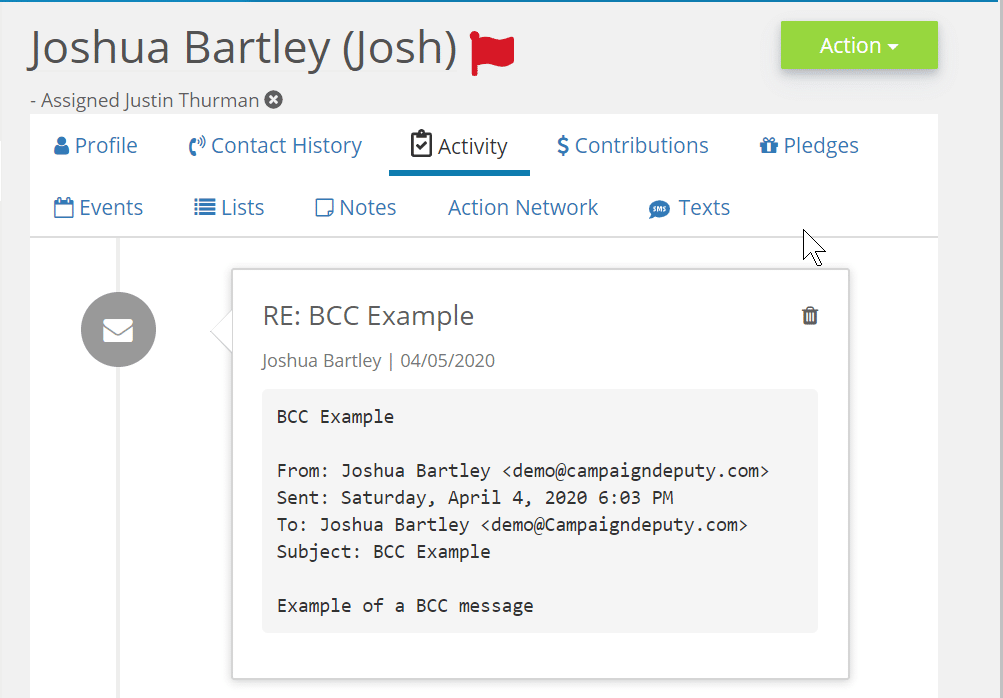
The second way, is a BCC Email. With each email you send, you can include your account’s specific email address in the BCC field and we will tag it to their profile. Saving you the extra step. The BCC email for your campaign will be your campaign’s full name followed by@campaigndeputymail.com. For example, your BCC email for “Alex for Senate” would be alexforsenate@campaigndeputymail.com. Check our our help documentation on how to automatically include this email as a BCC in G-suite, or Outlook.

Example of an incoming BCC email for a campaign

Mobile Texting

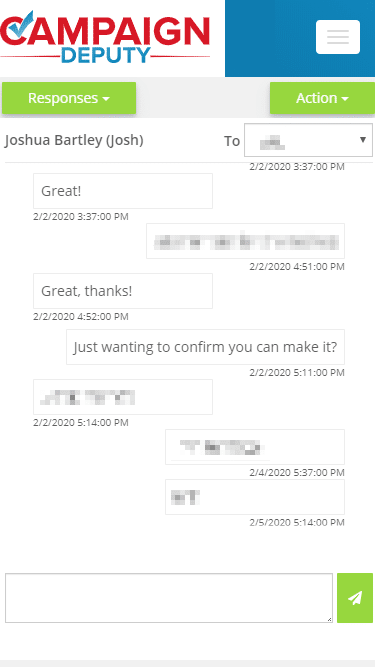
When we first launched our P2P texting, most volunteers were in the campaign office working side-by-side the Field Team for GOTV texts. Things quickly changed, so we changed our texting to have a mobile-friendly view.

Mobile view of texting.

New Domain Name

When we first launched, most websites ended with .com, .net, .org, or .io. Recent industry changes have allowed multiple new top level domains (TLDs) including .app. We wanted to let our security-minded users know that we also own campaigndeputy.app. It has the distinct advantage in that Chrome, Firefox, and Safari require all connections to be encrypted by default. Most connections only require it after the first connection. If you happen to block 3rd party domains as a privacy measure, please add an exemption for campaigndeputy.app in your browser plugin.

Other Updates

  • Fixed a padding issue on mobile devices for certain pages to make viewing easier.
  • Fixed an issue when editing debt payments that are linked to a disbursement.
  • Per new policies from the FEC, we moved a few compliance notes out of the memo field to the purpose field.
  • Fixed an issue with calculating Average Call Time on the call time report.
  • Thank You Note reports export dates to an easier date format.
  • Email images can be added while editing an email and can be dragged and dropped in the Editor.

Social Media Links

How do images and text show up when you add a link to your Facebook post or Twitter? Each one is different, Facebook has “Open Graph” and Twitter has “Twitter Card Tags”. Both allow you to tweak your message and show a short example of the content before someone clicks into your link.

Your Campaign Website

Your campaign website will be shared via social media channels. You can preview what a share would look like using the links below. If you have recently changed your website, you can use the tools below to refresh Facebook/Twitter’s copy of your website. Each page on your site can display a different image or message, make sure to test them all.

Ask you web designer to add the necessary tags to support Facebook and Twitter. If you are using WordPress, Yoast SEO provides options to choose what you want displayed. Squarespace also supports adding tags to your site.

Example of our site on Facebook

ActBlue

The ActBlue default tag is “I just gave to Candidate” and displays when you post an ActBlue link on social media. You can update this per each ActBlue contribution form to customize your message and even add your own logo to the link.

Campaign Deputy Forms

Our hosted forms support both Facebook Open Graph and Twitter Cards. You can update the message of a form by going to the Style tab and adding your own custom message to the Social Media Message field. Our forms are used for many different purposes, each form will need to be updated with a Social Media Message. Our embedded form option requires your web designer to select the tags for Facebook to pick them up correctly. Have your web designer contact our support team for more details.

Tech Talk: Performance

Most of our posts have been about fundraising, this will be about how we built Campaign Deputy to be quick to use for campaigns throughout the country. We started with the idea “be better, faster, and don’t crash”. With that, we set out to build a web application that can be fast, even if you happen to be on a 3G connection. Then we apply that same performance to out outbound features, forms, and page analytics.

Over half of our site loads in under 1 second.

We have been using a third party to measure how long it takes to load a page, commonly called RUM, Real User Monitoring. This tracks each time a user loads a page in our application, and records the time, and the time it takes to pull new updates for the page. Overall, more than half of our pages load in under a second. We accomplish this by creating the smallest possible page to load. The average size of a web page is over 3MB, ours is under 1mb down to 1/2mb. If you have ever tried to load a news article on a slow connection the page size matters a lot. After you load our site once, we cache everything and that page load turns into 1/16th of a MB. You likely have a word document larger than that.

Locations throughout the US that can load our forms.

Speed and distance also matter, so we have our code throughout the US that helps to load our forms. This allows our PopUp forms to load as fast as the page loads so you can capture all those new donors who go to your campaign page!

Further plans for 2019

First we are launching a new cloud based load balancer for our applications with more support for IPv6. We have redundant sites and connections to our servers, but they can be slow to react to changes. We also launched a status page so you can see in real-time how our system is doing at
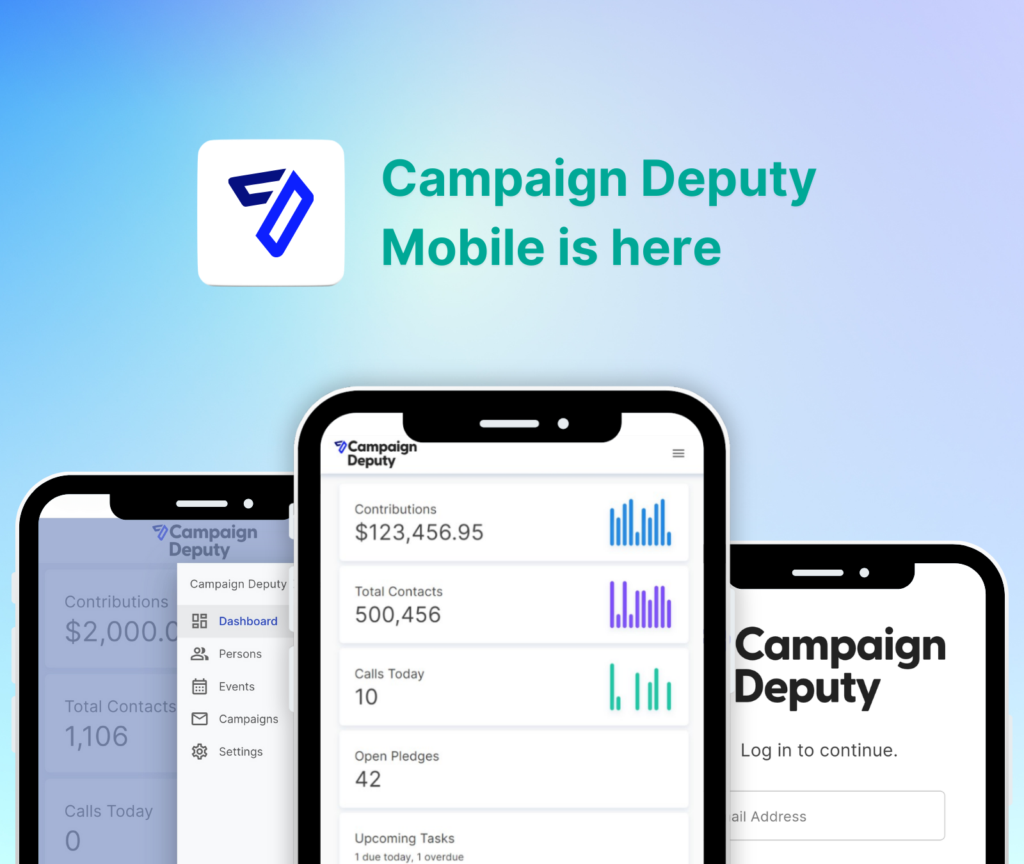
status.campaigndeputy.com so we can be transparent out our system health. Also with our launch of our mobile app, you’ll start to see more API access for integrations from the technically savvy campaigns out there.

Our development team says thanks for reading!